Java · Bedrock

How to join

Address, versions, registration and your first login — step by step for Java and Bedrock.

Address and ports

Server IP Tap or click to copy
Java port
the default — no need to type it
Bedrock port
Bedrock has a separate field for it

Step by step

Java or Bedrock

Java is PC only. Bedrock runs on Windows PCs, Android and iOS, and Xbox, PlayStation and Switch join through Xbox friends. One address, one shared world — only a few steps differ.

Java Edition

For PC. Any version from 1.21.4 works, and 1.21.11 is best. You don’t need a paid account: join from any launcher.

  • Version 1.21.4+
  • Best: 1.21.11
  • No paid account needed

Why 1.21.11

It’s the server’s own version. On other versions a version translator sits in between, so newer items may look or behave slightly differently. The newest version the server accepts right now is 26.3.

  1. Launch the game

    Start Minecraft: Java Edition, version 1.21.4 or newer.

  2. Multiplayer

    In the main menu click “Multiplayer”. If the game shows “Caution: Third-Party Online Play”, click “Proceed”.

  3. Add the server

    Click “Add Server” and fill in the fields: “Server Name” — MisterKrak, “Server Address” — misterkrak.cc. No need to add a port.

    Leave “Server Resource Packs” on “Enabled” or “Prompt” — just not “Disabled”.

  4. Join

    Click “Done”, pick MisterKrak in the list and click “Join Server”.

    Just a one-off visit? “Direct Connection” works too: type misterkrak.cc and go.

Java only · once

Your first login

Three short stages: the anti-bot check, registration and the resource pack. Here’s what you’ll see and what to do.

  1. Anti-bot check
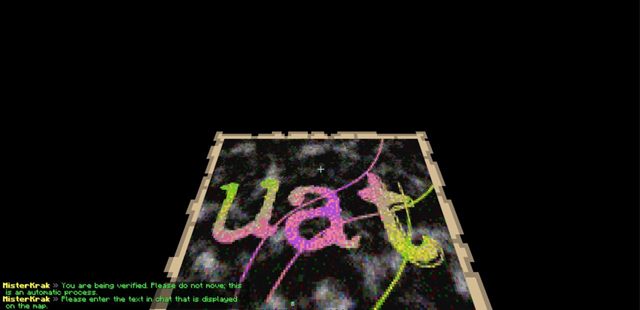
    The anti-bot check: a map with a code and a chat prompt to type it

    First comes a short fall onto a platform and a boat check: just don’t move. Then a map with a code appears — type the code in chat within 60 seconds; you get 3 tries. The game then reconnects you on its own.

    After a server restart you’ll get the check again. That’s normal.

  2. Register

    You’ll land in a dark, empty space — that’s expected. Pick a password and type it twice:

    There’s no minimum length, but very common passwords are rejected, so make up your own.

  3. Resource pack

    Once you’re on the server, the game offers a required resource pack with custom items. Click “Yes” — the server won’t let you in without it.

Next time

Every time you join, type:

  • Back from the same IP address within 24 hours? You won’t be asked for the password.
  • Own a paid account? If your nickname belongs to a paid Minecraft account and you join with it, you’re logged in automatically, no password. And nobody can take that nickname from a non-premium client.
  • Type the full commands — /register and /login: short forms may not work.
  • Forgot your password? E-mail recovery is off — ask the staff on Discord (opens in a new tab).

Nickname

  • Latin letters, digits and “_” only, up to 16 characters.
  • Type your nickname with exactly the same capitalisation every time, or the server will ask you to fix it.
  • No paid account? Don’t pick a nickname that already belongs to a paid account: the server will ask you to log in with that account, and you won’t get in.
  • At most 4 players can be online from the same IP address at once.

Bedrock Edition

For Windows PCs, Android and iOS — the steps are the same. You need the latest version of the game from your app store and a Microsoft (Xbox) sign-in.

  • Windows 10/11
  • Android
  • iOS

Fastest — one button

Open this page on a device with Minecraft and tap the button: the game should open and offer to add MisterKrak to your servers.

Add server

Only works where Minecraft Bedrock is installed: Windows, Android or iOS. Didn’t work? Add the server by hand — the steps are below.

  1. Update the game

    Install the latest Minecraft from your app store and sign in with a Microsoft (Xbox) account.

  2. Open Servers

    Tap “Play”, open the “Servers” tab, scroll to the bottom of the list and tap “Add Server”.

  3. Address and port

    Fill in the fields: “Server Name” — MisterKrak, “Server Address” — misterkrak.cc, “Port” — 19132. Tap “Save”.

  4. Connect

    Pick MisterKrak in the list and connect. The game asks to download the server’s resource packs — about 15 MB. Say yes: you can’t get in without them. After that they’re only downloaded again when they’re updated.

  5. Play

    No registration, no password — you’re logged in automatically. On the server your name gets a dot in front, and spaces become “_”: Steve Pro, for example, becomes .Steve_Pro.

Java and Bedrock are different players

If you play from both, those are two separate characters — Name and .Name — each with its own items and progress.

“Cheats are not enabled”?

That’s how Bedrock answers when a command doesn’t exist or you lack the permission. It has nothing to do with cheating — check how you typed the command.

Consoles

Xbox, PlayStation and Nintendo Switch don’t let you add a server by hand, so you join through Xbox friends: add a server account as a friend and MisterKrak shows up in the “Friends” tab like a friend’s world. You need the latest version of the game and a Microsoft (Xbox) account.

  • Xbox
  • PlayStation
  • Nintendo Switch

The server’s Xbox accounts

The main one is MistrKrak, the reserve is ProfiltAleh. Each can have up to 1000 friends. If MistrKrak hasn’t accepted your request after a few minutes, its list is probably full: add ProfiltAleh instead.

  1. Sign in to Microsoft

    Update Minecraft on your console to the latest version and sign in with your Microsoft (Xbox) account. On PlayStation and Switch the game offers the sign-in itself. Playing with friends may need your console’s own subscription: Game Pass, PlayStation Plus or Nintendo Switch Online.

  2. Add the server as a friend

    From your Microsoft account, send a friend request to MistrKrak: in the Xbox app on your phone or PC, on the Xbox itself, or right in Minecraft — the “Friends” tab, “Add Friend” button. The account accepts it on its own within a minute or two.

  3. Open “Friends”

    In Minecraft tap “Play” and open the “Friends” tab. MisterKrak2 appears among the games you can join: pick it and connect. The game asks to download the server’s resource packs, about 15 MB. Say yes: you can’t get in without them.

  4. Play

    From here it’s the same as Bedrock: no registration, no password, you’re logged in automatically. Your name gets a dot in front, and spaces become “_”: Steve Pro, for example, becomes .Steve_Pro.

A console is still Bedrock

With the same Microsoft account you’re the same .Name on your console as on your phone or PC, with the same items. A Java account is a separate player.

MisterKrak2 gone from “Friends”?

If you don’t join for 15 days, the server account removes you from its friends. Just send the request again.

Once you’re in

Good to know

Voice chat, the server language and your first commands — to find your feet faster.

Voice chat

Optional, but more fun. Install the Plasmo Voice mod, version 2.0.0 or newer, for your Minecraft version — and talk to the players near you, within 8, 16 or 32 blocks. The mod connects to voice on its own.

Plasmo Voice on Modrinth (opens in a new tab)

Java only: there’s no voice chat on Bedrock.

Server language

The server speaks Ukrainian, Russian and English. On your first join the language comes from your game settings; any other game language gets English. Switch it any time with /lang — the Bedrock menus switch along with it.

First commands

  • /menumain menu: RTP, spawn, homes, clans and more
  • /rtprandom teleport into the world
  • /sethome /homeset a home and get back to it
  • /spawnback to spawn

All commands

Help

Something went wrong?

The most common problems when joining — and what to do about them.

The game says my version isn’t right

Java: the server accepts 1.21.4 and newer — older clients are disconnected right away with a message that the version isn’t allowed. The newest version it accepts right now is 26.3: newer ones won’t connect until the server updates. 1.21.11 is best.

Bedrock: “Outdated Bedrock client!” means you need to update the game from your app store.

I can’t connect

First check the server status at the top of the page. During maintenance only whitelisted players get in; everyone else is disconnected with “The server is under maintenance!”.

If the server is online, check the address misterkrak.cc — and on Bedrock, port 19132 too. Someone on your network going through the anti-bot check right now? Wait a few seconds and try again. And remember: at most 4 players can be online from one IP address at once.

I can’t pass the anti-bot check

While you fall onto the platform and go through the boat check, don’t move. Type the code from the map in chat: you have 60 seconds and 3 tries. If the check fails three times in a row, joining from your IP address is blocked for 3 minutes — wait and try again.

The server won’t let me in because of my nickname

A Java nickname is Latin letters, digits and “_” only, up to 16 characters. Type it with the same capitalisation every time. And if the nickname belongs to a paid account, you can’t use it without that account — pick another one.

I declined the resource pack

Java: the server won’t let you in without the pack. If the server entry has “Server Resource Packs: Disabled”, the game disconnects you with “This server requires a custom resource pack”. Select MisterKrak in the list, open its settings, set “Enabled” or “Prompt” and join again — this time click “Yes”.

Bedrock: connect again and accept the download.

I forgot my password

Password recovery by e-mail is off. Ask the staff on Discord (opens in a new tab).

04 — Community

Our Discord

News, support and finding a clan. Link your account with /discord link to get the verified role.

Join Discord (opens in a new tab)
Members
—
online now
—